Showing posts with label ipads. Show all posts

Wednesday, November 12, 2014

Post-It Plus

I came across a fun new App just before half term. Do you think App should be with a capital? I don't know. Feels appropriate though. I was so excited, and maybe also disorganised that I downloaded it a lesson and then worked out how to use it and then did. I mean, yes I am like totally dramatic. Maybe also a tiny bit bad at grammar. So....sue me.

This app is called Post-it Plus; tagline from the website is 'Moving great ideas forward, from start to finish.' Whatever that means. Basic premise though, and I literally have no idea how they did this is that you can get your class to write their ideas on a post-it note. Perhaps you are brainstorming a question, or discussing what has been covered and learnt in the class. You can then take a picture of this on your iPad and the App recognises the post-its and scans them in.

This App works with my Apple tv, so I can airplay my iPad. Obviously it would be very difficult to read what these say as they are tiny. You can then double tap on them and a gallery opens. So you are able to flick through what the class has written. I like doing this to consider ideas for answers and then we bin the less good ones and keep the ones we all agree on.
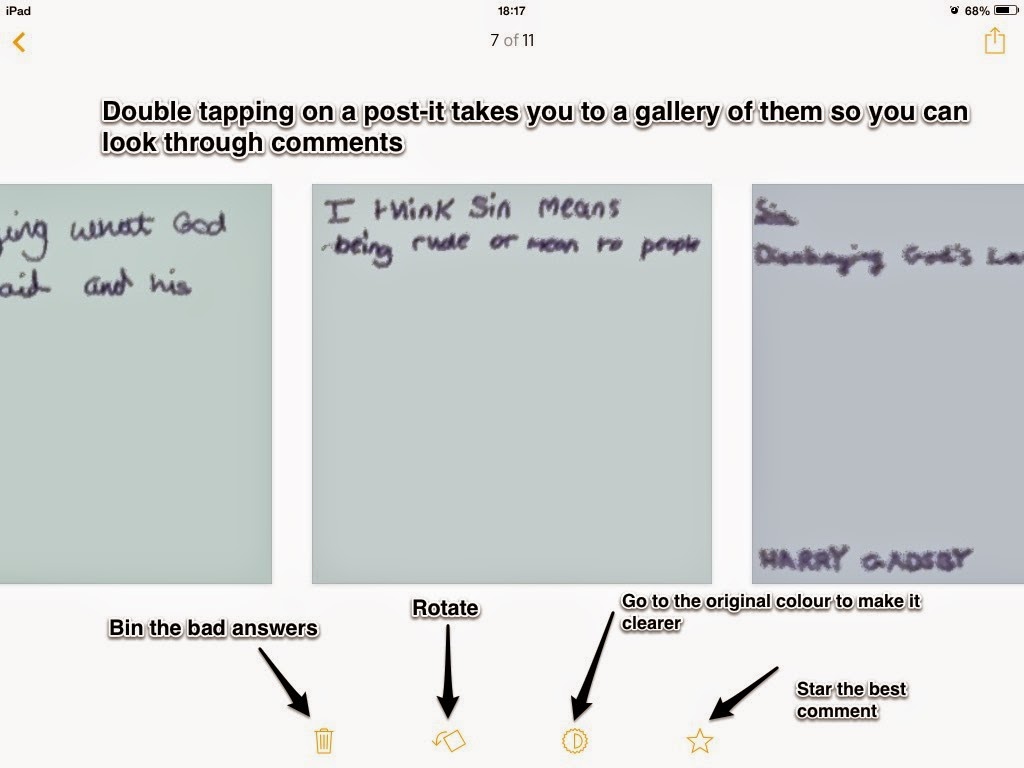
If what you have done in the lesson has been worthwhile and you'd like the children to have access to the information you can then share the page. I often upload it to a shared Google Drive folder.

So there we have it, Post-it Plus. A useful App to have in the classroom.

FYI I used a new App to anotate my iPad pictures. Need to work out how to unborder my text!

Monday, November 10, 2014

Adsy: App design

One of the things I love most about twitter is the chance to hear about new technology early on. It makes me seem cutting edge to my friends pupils the fact that most of the time I am pretty much a total dork. While doing some late night twittering due to my food poisoning last week I came across some mentions of a website called adsy. It promised to be a web platform through which I could make apps. I checked it out, and having watched the instructional video managed to understand it.

While what you can achieve is simple; you can only include text, pictures of videos but there is no way to give the user a way to input their own text, what I do like about it is the way it teaches children some of the basics of how one would go about building an app. In my PSHE lessons where we had been discussing revision as the school exams are looming I let them spend some time having a go at designing one as a revision tool. It was very easy and once set up they were able to get on with their apps on our school ipads. In my pipedream I had imagined they would all finish in 1/2 hour and we could share them with each other. It did take a lot longer and none of them finished but I think it was still a worthwhile exercise. There were a couple of children who thought it was seriously exciting. Best for me was the girls who got into it. I was reading today about the digital apartheid which will exist for those who do not understand how to code.

This morning I was reading all about Reshma Saujani who set up Girls who code an initiative which tries to get girls to learn to code. I feel like my use of adsy with my girls was a chance to get them to see that coding isn't something done by spotty boys in hoodies, it can be done by them too. They were seriously excited about their creations, about putting in videos and music, and as yesterday was Teach Girls to code day, that seemed apt!

If you are interested, here is a link to the app I made with one of the boys. We were so keen we finished it in break time. Score.

Have you tried adsy? I would love to see any of the apps you have made.

Monday, November 3, 2014

My favourite collaborative tools.

Collaboration is such a big word in education right now. I once went to a seminar which began with, and I kid you not 20 different videos or pictures of famous people in films talking about the importance of collaboration. Suffice to say, it was not a good seminar!

Despite this, collaboration in the classroom is something I really believe in. I think it is fundamentally important for pupils to be able to brainstorm ideas and share them together so they have a real chance to learn from one another. Here is a list of a few of the ways I do this in the classroom.

Both of these online tools allow a class of children to share their ideas on a certain subject. You can get them to answer a question together, or share what they have learnt from the lesson as part of the plenary. If we are brainstorming we focus on what has been written and then whittle down to which we think are the best suggestions. I would then share the webpage with them so when they are completing homework later on they can refer back to what was suggested and utilise the best ideas.

This can be used in a number of different ways. I can create a document which they share their ideas into, or they can complete a piece of work with another person without the hassle of sending versions back and forth. They can make slideshows, word documents or spreadsheets. Last night I found this super helpful video explaining how to use collaboration on Google drive.

  • Videos

This is a new one for me but next week I am going to try creating videos with my year 7s and 8s as a revision tool. We spend a lot of time brainstorming different Common Entrance questions and talking about how they could be answered. I am planning to get them to record a point for a question and upload it to a folder. When they are all uploaded we will edit them in iMovie and each child will cut together the best points so we will get an idea of what might be written in the answer. I am so hoping it will work, I will report back and let you know!

I’d love to hear any other useful collaboration tools you use in your classroom. Thanks for reading.

Wednesday, October 29, 2014

Copy of an article I wrote for Satips Magazine

An article I wrote for Saptips magazine

If someone had labeled me as someone who encouraged collaboration back in the 1940s it would have been an enormous insult. At that time the only use of the term would have been to suggest assistance with the enemy during the last war. How things have changed! Within the Technology community this is one of the current buzzwords. On a recent Google in Education conference this was a big theme. I have lost track of the amount of articles I have read where new ways to collaborate within education are explained. If we take a moment to think about our teaching, I am sure we would realize that collaboration has become important. Perhaps we encourage it though group work, paired work or by setting a homework where pupils are working together on a presentation for the rest of the class. A new way in which collaboration is becoming more possible is through our use of ICT.

Technology within education is an emerging market that even traditional private schools are starting to embrace. At my school we have iPads, laptops and two ICT rooms. We have not gone along the 1:1 route, preferring instead to educate staff in what they could be using in their classrooms believing they are able to make the decision about what is relevant and useful for them. I am involved in this training providing one to one sessions focused on the particular needs a teacher has. I have begun regularly attending lessons with a few staff assisting them as they try to integrate ICT in their lessons as well as running INSET sessions for staff. For me this has been a fascinating journey that began only in September when 20 iPads appeared in my building. I picked one up, did some research, found some good apps and began using them. I teach Religious Studies, not a traditional subject to be linked with Tech. I found that as my understanding and knowledge of what was available grew, I was able to bring in easier ways to do things, and started having some wow lessons where pupils were engaged, excited and interested in what we were learning.

My experiences this year have lead to some reflections on the role that Technology can have in a Prep School. I am not a teacher who believes that the lesson changes to fit the technology; instead my lessons are enhanced by what I am able to do. Dare I say it; sometimes I am able to save time too!

What I like most is the fact that my pupils are able to learn from one another. In my view the time where the only way to teach was to stand up at the front and recite information is gone. While didactic teaching can have its place; this is not the only way to learn. For myself, lessons are a time when we come together to discuss a topic. Everyone can learn from everyone and often I find myself leaning on the table and saying ‘gosh, I had not thought of that!’ We do research together on iPads as we begin a topic and then pull our ideas together. Or I might set them a competition and they have to quickly find the answer to a question from the Internet. I am fortunate to Apple TV in my classroom, which is invaluable for this. With older children if we are trying to work out how to answer a particular Common Entrance question I might set up a Padlet wall and they log onto it and offer a response. After everyone has contributed we can look through and together decide which are the strongest. Being able to learn from one another encourages a positive working environment and setting Internet challenges teaches research skills. Those who might not have the confidence to put their hand up during a question and answer session might gain the confidence they need to speak from the knowledge their answer comes from the Internet.

The second reason I think the use of Technology is important is because it engages the pupils. Everyone in our school loves a lesson when they are using iPads. My year 7s have just completed a piece of coursework using Google Drive where they have shared their work with me and I have been able to make live comments on it; highlighting different sections that I was not happy with and making suggestions for improvements. They’ve been able to research easily, import pictures easily and even cite their sources easily. Another class enjoyed making presentations after visiting different places of cultural significance from around the world using the Google Cultural Institute. Our year 3s have even made Popplet mind maps about what they think Jesus is like after choosing and importing a picture they liked from the Internet. For these children technology is normal. Many of those I teach are fortunate enough to own a tablet and they will sit at home doing all kinds of cool things on them. What I want to do is bring that sense of wow into the lessons. I try to teach how the children want to learn; For a tech savvy generation that means bringing in use of ICT.

My final benefit for the use of ICT is the time saving it can offer staff. This I had not fully anticipated, but have very much been reaping the benefits of. The coursework already mentioned usually fills the entire Summer term, with some pupils catching up during the holidays. This has not happened this year. All of them are finished and the reason for this is the swift responses I have been able to make to their work through our use of Google Apps. Other time saving comes through simple apps which we use to make posters for our display boards. Or a member of staff might set up a quiz online which self marks and then the results are emailed to the teacher for them to input in their mark book.

Something I have recently been trying out has been personalized work for lower ability pupils. Using iPads I am able to set them a worksheet that has been changed to suite their learning needs. If they struggle to write sometimes completing this on an iPad is extremely profitable as their typing speed might be quicker than their writing speed. On the whole they enjoy this, and it boosts their confidence to not always be the last to finish a task. The proficiency they might have with ICT means that for once they might be able to help a peer with something. I had a lovely lesson recently when we took some year 8s down to a year 3 class and they helped one another to use Padlet.

Making the effort to use technology in the classroom is only worthwhile if there are benefits.